
Advanced Technology
GEOMAGIC Studio
描述
![]() |
Geomagic Studio
Create accurate digital models from physical parts |
![]() |
Geomagic Qualify
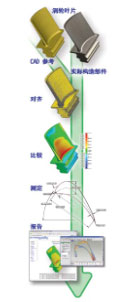
Digitally inspect as-built versus as-designed parts |
What does Geomagic Studio do?
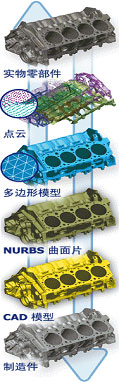
Geomagic Studio automatically creates accurate digital models from scan data of physical parts. It captures, describes and represents complex real-world objects for use in CAD, CAM, or CAE systems.
Can Geomagic Studio work with objects that have no CAD data?
Yes. With Geomagic Studio you start with the physical object rather than a blank screen, allowing you to leverage or repurpose existing designs or work with objects that have no CAD data.
What 3D data representations does Geomagic Studio support?
Geomagic Studio offers true multi-format modeling covering points, polygons and NURBS, with data integrity ensured regardless of how the model is represented.
What applications does Geomagic Studio support?
Geomagic Studio can process and model complex shapes for applications including reverse engineering, design and analysis, mass production of customized devices, build-to-order manufacturing, visualization and digital archiving.
Is Geomagic Studio compatible with other hardware and software?
Geomagic Studio works with popular 3D scanners, CAD and graphics software, and rapid manufacturing systems, so your investment is compatible with your other technology investments.
What quality standards has Geomagic Studio met?
Geomagic Studio passed PTB's strict standards for surface- and curve-fitting algorithms, and it utilizes patented technology and algorithms that enable 3D models with high quality surfaces, accurate geometry, color and textures.
Back to Product Index

Solution Centre
Service Hotline 400-889-8282